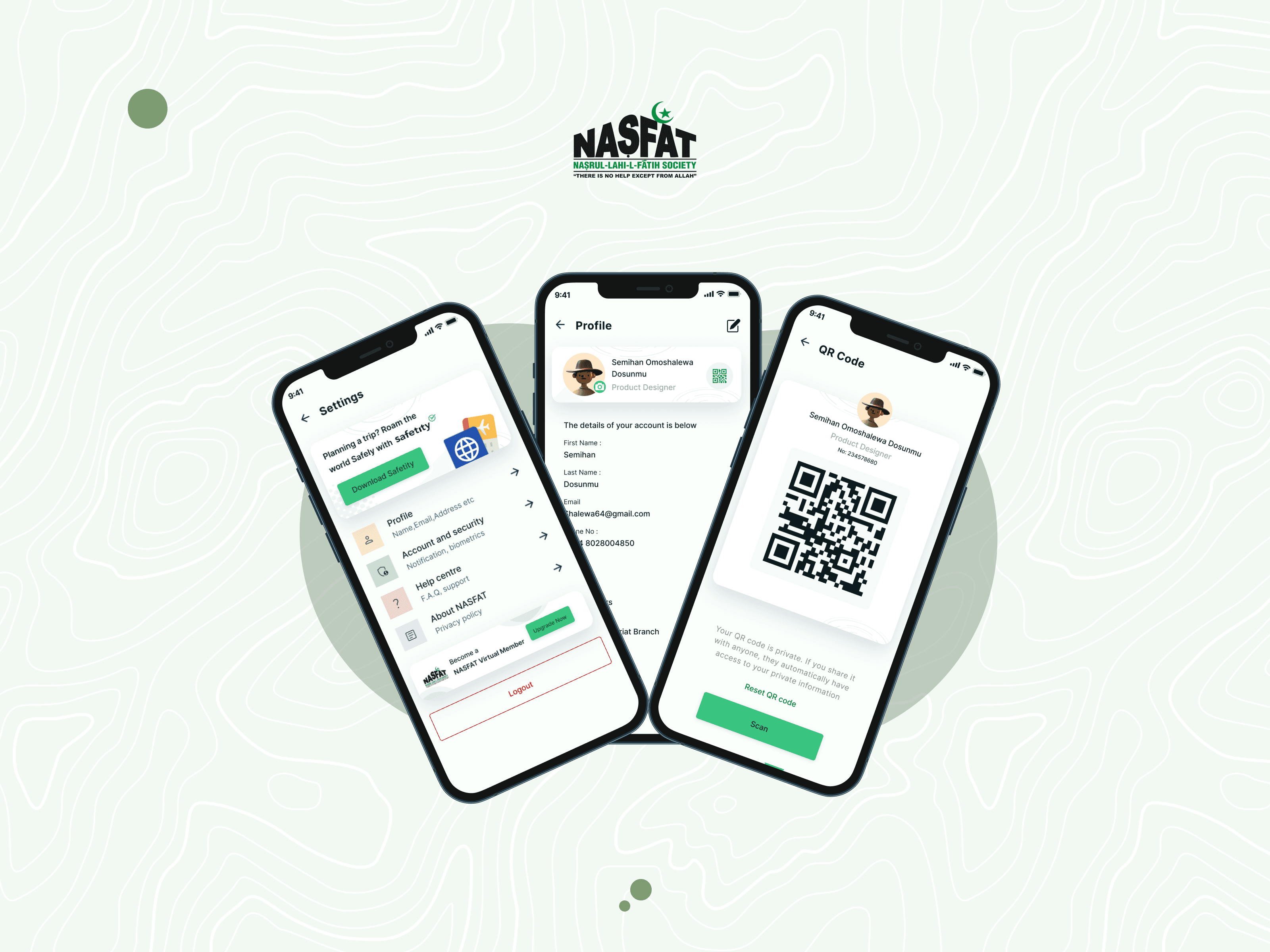
NASFAT: Transforming Tradition with Digital Innovation

NASFAT: Transforming Tradition with Digital Innovation

NASFAT: Transforming Tradition with Digital Innovation

Role

UI/UX Designer

Platform

Non profit, SaaS, Mobile

Tools

Figma, webflow

Timeline

3 months

Role

UI/UX Designer

Platform

Non profit, SaaS, Mobile

Tools

Figma, webflow

Timeline

3 months

Overview

Streamlining Membership Management for Better Engagement

Streamlining Membership Management for Better Engagement

Streamlining Membership Management for Better Engagement

What is NASFAT?

NASFAT (Nasrul-Lahi-L-Fatih Society of Nigeria) is a faith-based organization that fosters spiritual growth, education, and community development. With its rapidly expanding membership, managing renewals and activations efficiently has become crucial to maintaining member engagement and satisfaction.


The membership management process was fraught with challenges, including verifying member details, activating accounts, and processing payments. These inefficiencies led to delays, dissatisfaction among members, and increased administrative workload. The project aimed to design a seamless, user-friendly membership management system that automates repetitive tasks, minimizes errors and empowers members and administrators to achieve smooth account activations and renewals.

My Role

Championing a Member-Centric Solution

As the Product Designer for this project, I took on the responsibility of transforming the membership management platform into a seamless, efficient system. My key contributions included:


  • Conducting in-depth user research to identify pain points faced by members and administrators.

  • Creating wireframes and prototypes to visualize the solution and define the flow for account activation, legacy data integration, and payment processes.

  • Collaborating with developers to ensure the designs were implemented as envisioned, focusing on simplicity and clarity.

  • Iterating on the interface based on feedback from testing sessions with NASFAT members and administrators.

Accessibility Considerations

Designing for All People

  • Followed WCAG 2.2 AA guidelines

  • Ensured keyboard navigability and visible focus states

  • Optimized link text and button labeling for screen readers

  • Designed responsive layouts with magnification and low-vision users in mind

  • Followed WCAG 2.2 AA guidelines

  • Ensured keyboard navigability and visible focus states

  • Optimized link text and button labeling for screen readers

  • Designed responsive layouts with magnification and low-vision users in mind

  • Followed WCAG 2.2 AA guidelines

  • Ensured keyboard navigability and visible focus states

  • Optimized link text and button labeling for screen readers

  • Designed responsive layouts with magnification and low-vision users in mind

Challenges

Untangling the Knots of Membership Management

Managing NASFAT’s growing membership base was like navigating a web of disconnected processes. From outdated information to manual verification, the system struggled to keep up with the organization’s needs.

"It’s frustrating when you know you’re a member, but the system makes you feel like a stranger."

– A NASFAT Member

"It’s frustrating when you know you’re a member, but the system makes you feel like a stranger."

– A NASFAT Member

"It’s frustrating when you know you’re a member, but the system makes you feel like a stranger."

– A NASFAT Member

Objectives

The goal was to simplify and streamline the membership management system by:


  • Automating repetitive and manual tasks to reduce errors and delays.

  • Creating a clear, guided process for verifying member details and activating accounts.

  • Designing a platform that ensures satisfaction for both members and administrators through a seamless experience.
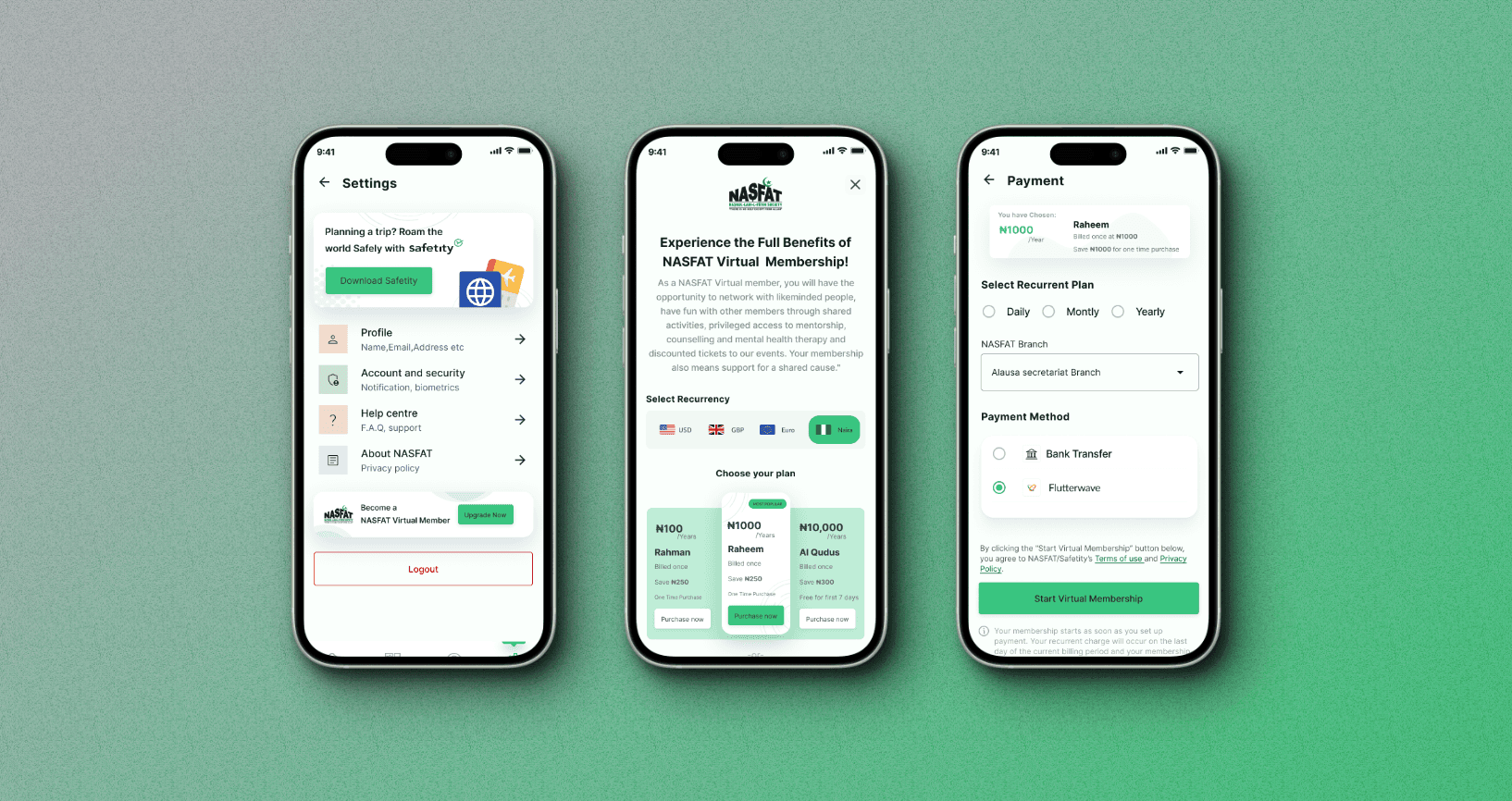
Membership management

Membership management

Membership management

Research & Insights

Understanding the Membership Maze

To address the challenges of membership management, I conducted extensive research with both NASFAT members and administrators. The goal was to uncover the root causes of inefficiencies and design a solution that catered to their needs.

User Research


Interviews and surveys were conducted with existing members and admins to explore their experiences and expectations. Members expressed frustration with the lack of clarity during account verification and renewal, while admins highlighted the overwhelming workload caused by manual processes.

Key Findings

Understanding user challenges revealed inefficiencies in the membership management process, impacting both members and admins.


  • Disconnected Member Data: Members often couldn’t recall branch name, email, or phone number, causing delays in verification.

  • Manual Verification Overload: Admins spent too much time manually linking old data, leading to errors and inefficiencies.

  • Payment Barriers: Confusing instructions and delays in payment processes frustrated members and led to incomplete renewals.

  • Accessibility Challenges: Members without access to their registered email or phone struggled to recover accounts.


These insights guided the development of a seamless, automated platform to simplify processes and enhance user satisfaction.
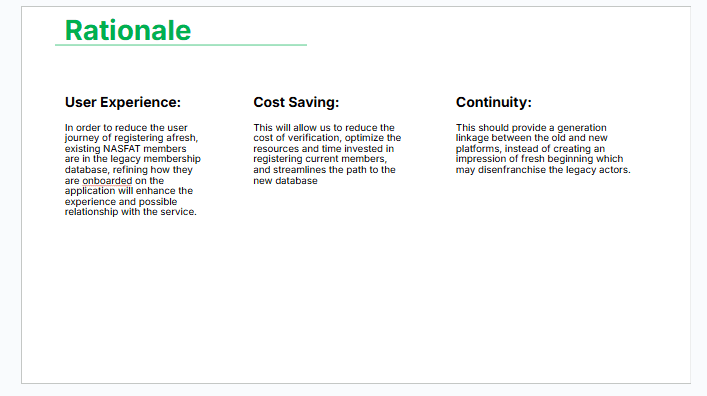

A visual breakdown of user pain points

Solution

Designing a Seamless Membership Management Experience

The membership management platform was designed to address key pain points uncovered during research, focusing on simplicity, automation, and accessibility.

Key Features and Improvements

Guided Verification Process:


  • A step-by-step flow to help members verify their primary details (branch, email, or phone number).

  • For those without access to registered details, an option to register afresh while linking to old data in the legacy database.
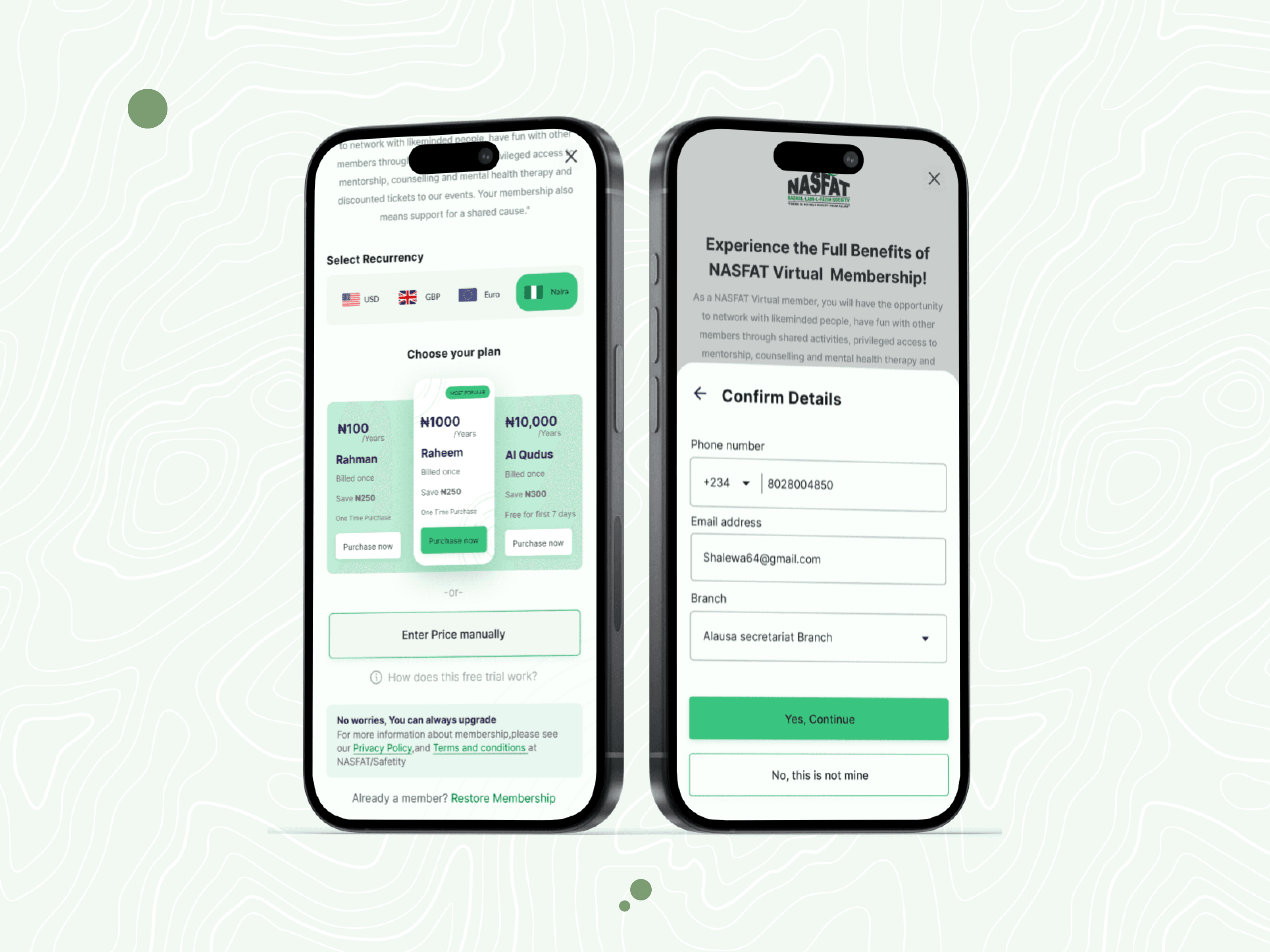

Verify identity by restoring membership
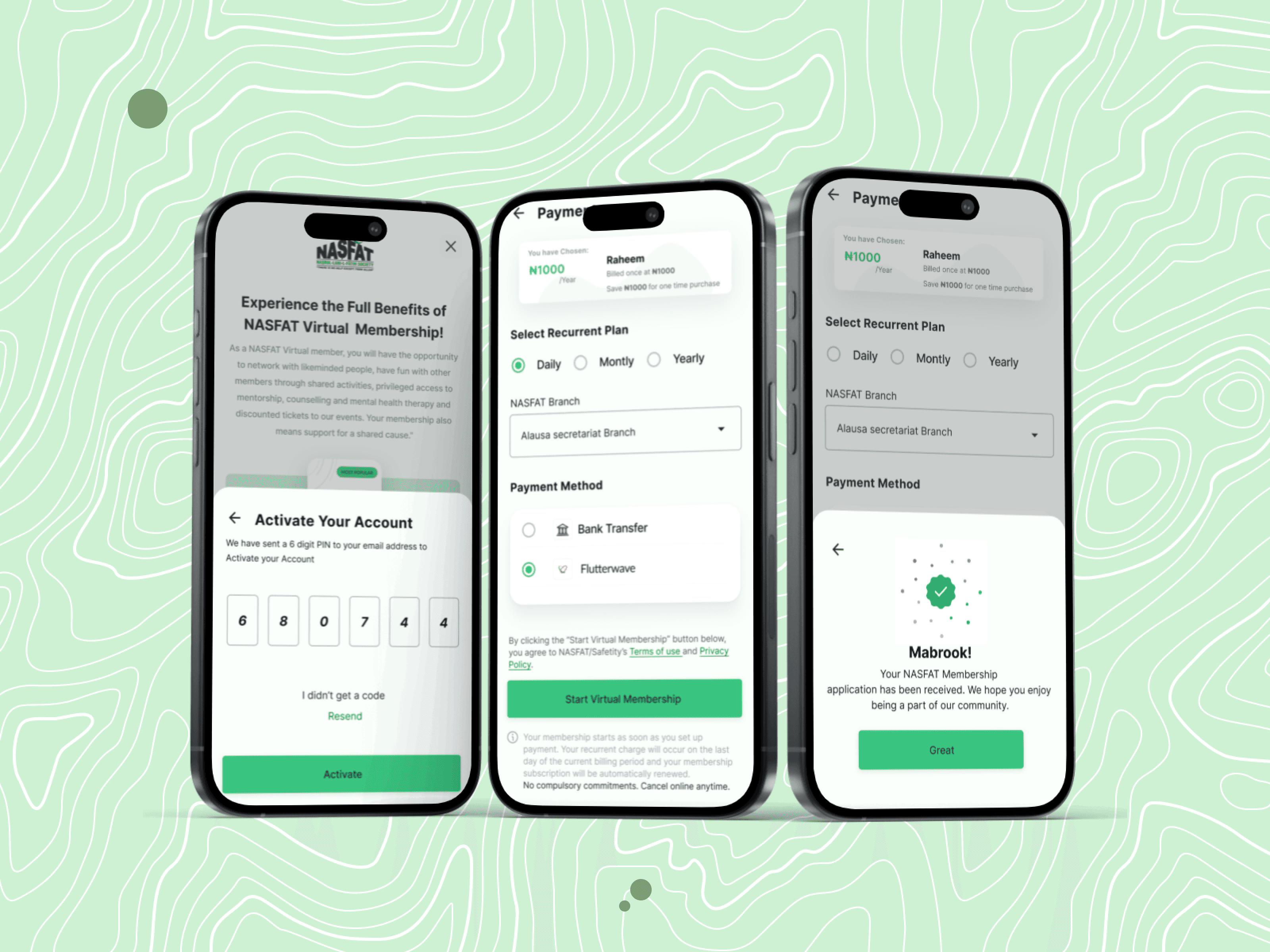
Automated Notifications:


  • OTP (One-Time Password) system for secure verification of member contacts.

  • Automatic notifications for payment reminders and successful activations.

Automated Notifications:


  • OTP (One-Time Password) system for secure verification of member contacts.

  • Automatic notifications for payment reminders and successful activations.

Automated Notifications:


  • OTP (One-Time Password) system for secure verification of member contacts.

  • Automatic notifications for payment reminders and successful activations.

An OTP system to activate membership

Admin Tools for Efficiency:


  • Tools for admins to quickly link members to legacy data and resolve account discrepancies.

  • Dashboards providing a centralized view of pending tasks, completed activations, and membership metrics.

Admin Tools for Efficiency:


  • Tools for admins to quickly link members to legacy data and resolve account discrepancies.

  • Dashboards providing a centralized view of pending tasks, completed activations, and membership metrics.

Admin Tools for Efficiency:


  • Tools for admins to quickly link members to legacy data and resolve account discrepancies.

  • Dashboards providing a centralized view of pending tasks, completed activations, and membership metrics.

My process

From Concept to Execution

I began by mapping the existing membership management journey, identifying bottlenecks, and brainstorming solutions with stakeholders. This stage helped align the team on the core challenges and objectives.

Discovery and Ideation
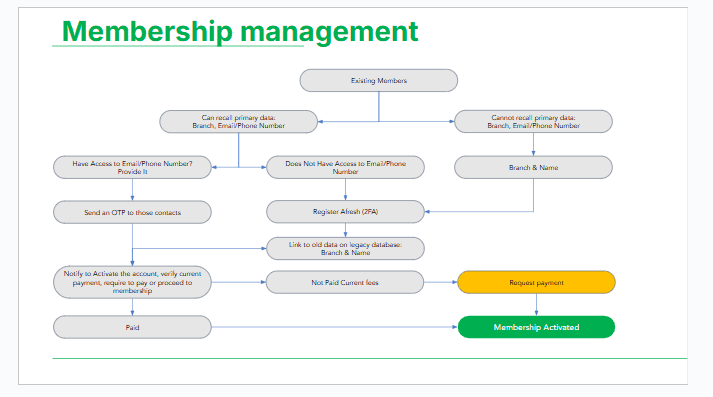
I began by mapping the existing membership management journey, identifying bottlenecks, and brainstorming solutions with stakeholders. This stage helped align the team on the core challenges and objectives.

Sketching, Wireframing, and Development


To address the complexity of user and admin tasks, I designed a detailed user flow that outlined the key interactions for:

  1. Verification Flow: Account verification via branch, email, or phone details—or new registration for missing legacy data.

  2. Payment Flow: A seamless interface for secure and easy membership fee payments.

  3. Admin Flow: Efficient tools for linking legacy data and resolving account discrepancies.

User Flow


The user flow below visually captures these processes, showing how members interact with the system to verify their accounts, make payments, and complete the membership journey. Administrators’ touchpoints for resolving issues are also integrated, ensuring a holistic view of the system.


Photo Description:
The user flow diagram illustrates three main pathways:


  • Verification Process: Options for verifying or registering accounts based on user input.

  • Payment Process: A secure transaction flow with confirmation feedback loops.

  • Admin Resolution Process: Steps for resolving flagged accounts or linking data.


These flows were the foundation for wireframes and high-fidelity prototypes, ensuring a logical and user-friendly design.

I began by mapping the existing membership management journey, identifying bottlenecks, and brainstorming solutions with stakeholders. This stage helped align the team on the core challenges and objectives.

Sketching, Wireframing, and Development


To address the complexity of user and admin tasks, I designed a detailed user flow that outlined the key interactions for:

  1. Verification Flow: Account verification via branch, email, or phone details—or new registration for missing legacy data.

  2. Payment Flow: A seamless interface for secure and easy membership fee payments.

  3. Admin Flow: Efficient tools for linking legacy data and resolving account discrepancies.

User Flow


The user flow below visually captures these processes, showing how members interact with the system to verify their accounts, make payments, and complete the membership journey. Administrators’ touchpoints for resolving issues are also integrated, ensuring a holistic view of the system.


Photo Description:
The user flow diagram illustrates three main pathways:


  • Verification Process: Options for verifying or registering accounts based on user input.

  • Payment Process: A secure transaction flow with confirmation feedback loops.

  • Admin Resolution Process: Steps for resolving flagged accounts or linking data.


These flows were the foundation for wireframes and high-fidelity prototypes, ensuring a logical and user-friendly design.

I began by mapping the existing membership management journey, identifying bottlenecks, and brainstorming solutions with stakeholders. This stage helped align the team on the core challenges and objectives.

Sketching, Wireframing, and Development


To address the complexity of user and admin tasks, I designed a detailed user flow that outlined the key interactions for:

  1. Verification Flow: Account verification via branch, email, or phone details—or new registration for missing legacy data.

  2. Payment Flow: A seamless interface for secure and easy membership fee payments.

  3. Admin Flow: Efficient tools for linking legacy data and resolving account discrepancies.

User Flow


The user flow below visually captures these processes, showing how members interact with the system to verify their accounts, make payments, and complete the membership journey. Administrators’ touchpoints for resolving issues are also integrated, ensuring a holistic view of the system.


Photo Description:
The user flow diagram illustrates three main pathways:


  • Verification Process: Options for verifying or registering accounts based on user input.

  • Payment Process: A secure transaction flow with confirmation feedback loops.

  • Admin Resolution Process: Steps for resolving flagged accounts or linking data.


These flows were the foundation for wireframes and high-fidelity prototypes, ensuring a logical and user-friendly design.

Membership management Userflow

Reflection

What I Learned Along the Way

This project highlighted the importance of user-centric design and strong cross-functional collaboration. It reaffirmed that understanding user needs and addressing pain points are crucial to creating impactful, engaging digital products.

Key Results


  • Streamlined Membership Management: Simplified account verification, payments, and activations, boosting user satisfaction.

  • Increased Engagement: Added prayer time tracking and an Islamic calendar, enhancing daily app usage.

  • Optimized Performance: Partnered with developers to reduce load times by 40% and improve user retention by 34%.

Other Projects

Let's Connect!

Let's Connect!

Let's Connect!

© Copyright 2023. All rights Reserved.

Made by

Me

in

© Copyright 2023. All rights Reserved.

Made by

Me

in

Create a free website with Framer, the website builder loved by startups, designers and agencies.