Overview
What is AtechPadi?
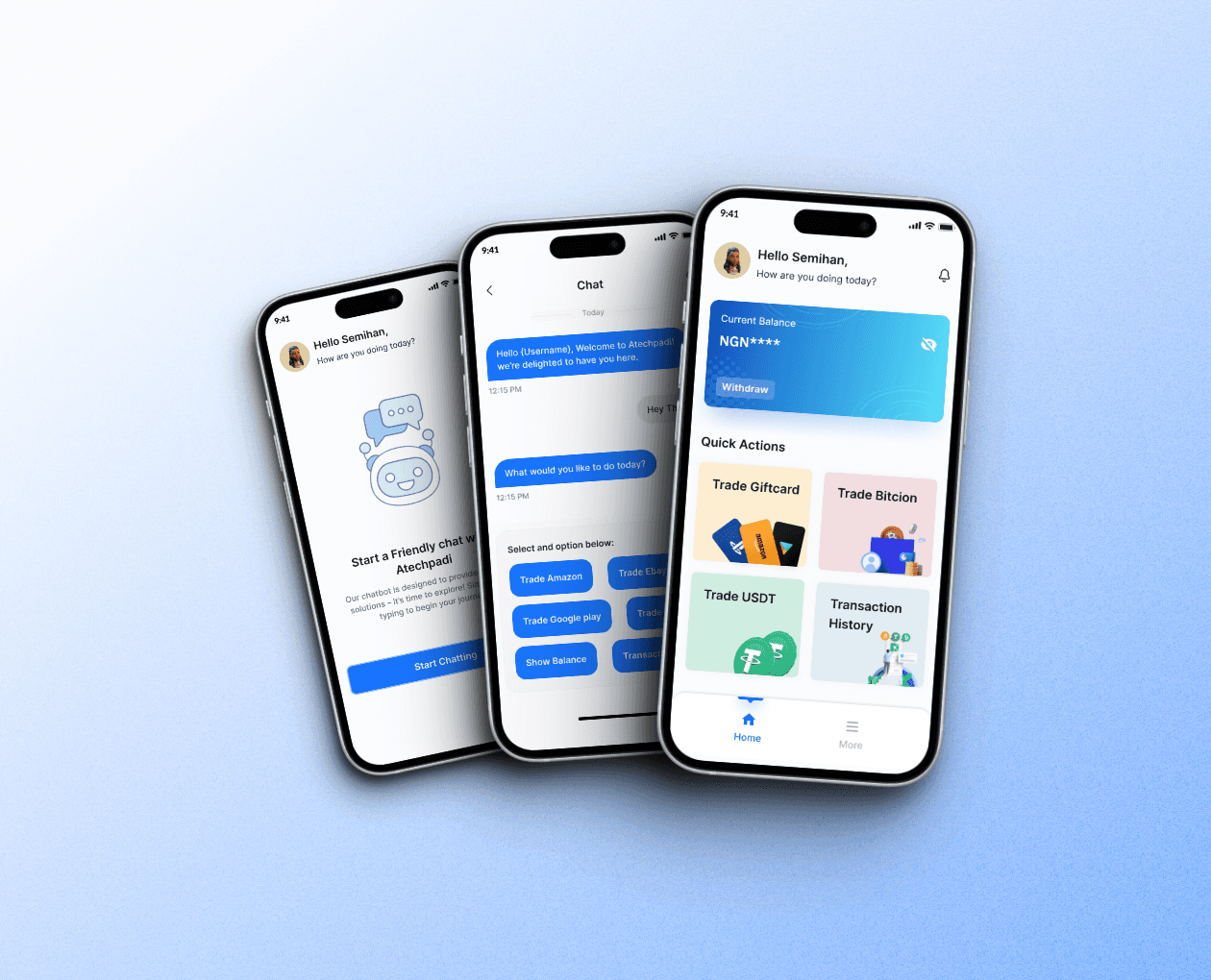
Atechpadi is a mobile application under the Atechcoins umbrella, designed to simplify crypto trading, gift card transactions, and bill payments for users. The platform aims to provide a secure, seamless, and user-friendly experience, empowering users to handle financial transactions with confidence.
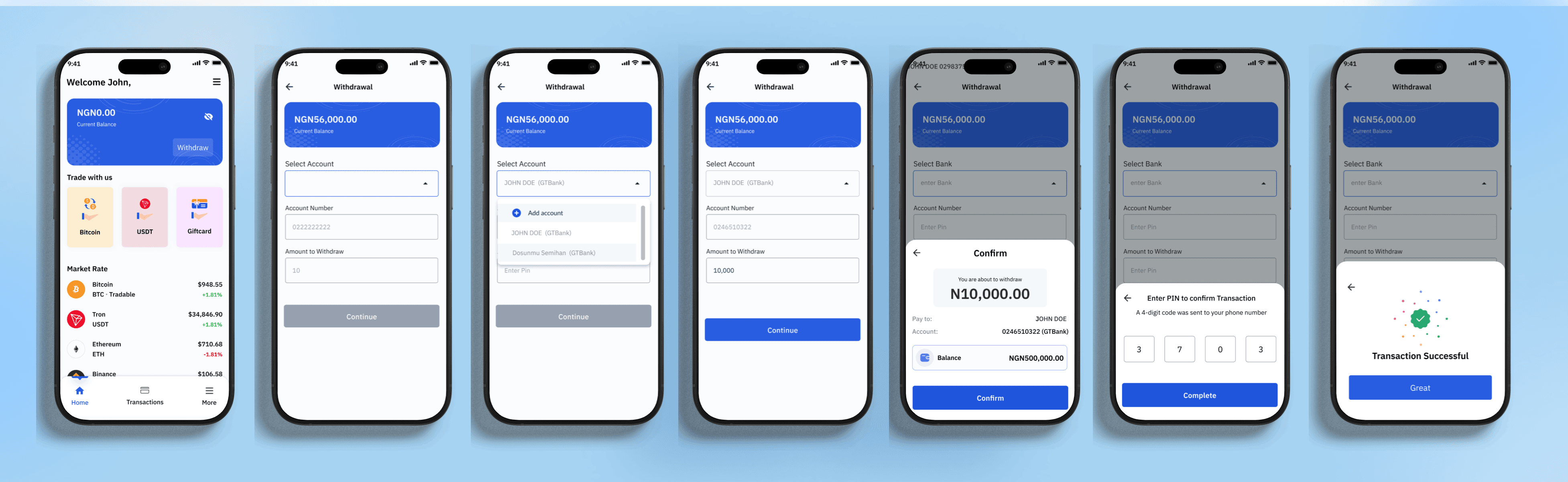
Despite its broad utility, the app faced significant challenges in its withdrawal process, a critical feature for users. Feedback indicated that some users were unable to withdraw funds due to missing or invalid Two-Factor Authentication (2FA) setups, forgotten credentials, or technical issues with their linked bank accounts. These barriers not only led to frustration but also impacted user trust and retention rates.
My Role
My Contribution to the Solution
As the lead designer, I was responsible for:
Conducting user research to understand withdrawal-related pain points.
Ideating and designing a secure, flexible withdrawal process.
Collaborating with developers to ensure seamless implementation.
Testing and iterating the designs based on user feedback.
Accessibility Considerations
Designing for All people
Challenges
Tackling Roadblocks
The withdrawal process was neither intuitive nor inclusive of fallback mechanisms. Users who didn’t have access to their 2FA setup often found themselves locked out, while unforeseen bank issues disrupted smooth transactions. This lack of reliability and flexibility created a significant pain point, diminishing user satisfaction and trust in the app.
"Designing with flexibility and foresight is crucial; when systems fail to account for unforeseen issues, they create barriers that erode user trust and satisfaction."
Objectives
To design a robust and user-friendly withdrawal process that:
Enhances Security: Introduce a secondary authentication method using security questions, ensuring users can withdraw funds even without 2FA.
Provides Flexibility: Allow users to update their security questions and linked bank accounts effortlessly, with minimal friction.
Increases Reliability: Offer clear communication and error handling when banks cannot be credited, guiding users to update their details seamlessly.
Research and Insights
Discovering Key User Insights
To identify the root causes of challenges users faced with withdrawals and uncredited bank transfers, we conducted comprehensive research examining user behaviors, preferences, and pain points. Through interviews, surveys, and usability testing, we uncovered critical issues, including security concerns, limited verification options, and frustrations stemming from failed bank transactions. Additionally, users expressed a strong need for greater flexibility, such as the ability to update security questions and manage bank details seamlessly.
Key Findings
Security Concerns: Users desired stronger verification measures to ensure their transactions were secure.
Accessibility Issues: Not all users could access or use authentication apps effectively, creating a barrier in the verification process.
Bank Transfer Failures: Resolving failed transactions was challenging, leading to frustration and mistrust in the system.
Flexibility: Users wanted the ability to update security questions and account settings effortlessly.
To better understand these pain points, I created a user journey map that outlines the withdrawal process in a fintech app. This map breaks down the process into key stages, visually representing user pain points, emotions, and frustrations using color coding and icons. The insights from this journey map informed solutions that enhanced trust, efficiency, and accessibility within the withdrawal system.
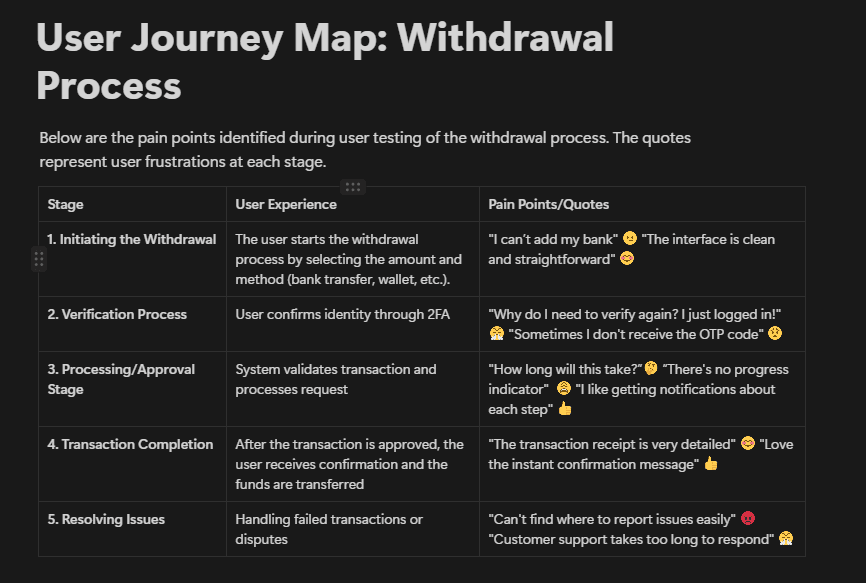
User journey map showcasing key stages of the withdrawal process, highlighting pain points, emotions, and frustrations with color coding and icons.
Solution
Turning Insights into Action
To address the withdrawal challenges faced by users on the Atechpadi app, I implemented a comprehensive solution focused on enhancing security, flexibility, and user confidence. This included introducing three secure withdrawal options: Security questions, Email verification, and Authentication apps. Each option was designed to provide a seamless yet secure experience, reducing friction and ensuring easy access to funds.
To resolve the issue of uncredited bank transfers, I developed a mechanism that prompted users to update their bank details when errors occurred, guiding them through the process to minimize frustration and ensure successful withdrawals.
These solutions were seamlessly integrated into the app with intuitive flows that prioritized simplicity and accessibility, ultimately improving trust and user engagement.
Design Details
Security Questions:
Created a new screen allowing users to select and answer random security questions during setup.
Users can update their security questions from the settings page, with a two-factor authentication (2FA) verification step for added security.
Hints are displayed during withdrawals, ensuring clarity while maintaining security.
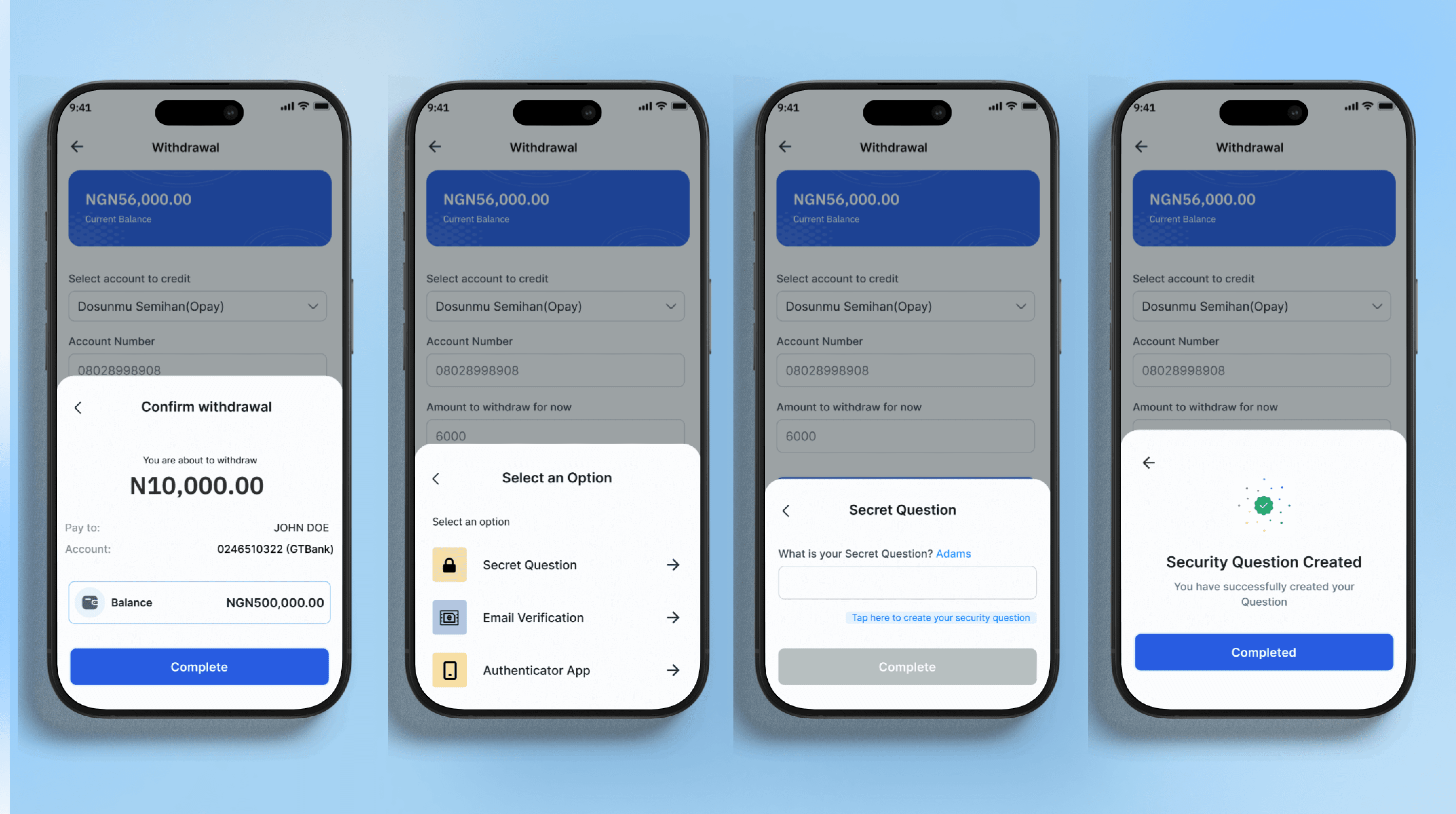
The withdrawal flow displays options for selecting a preferred withdrawal method. Helpful hints are provided to ensure clarity and security.
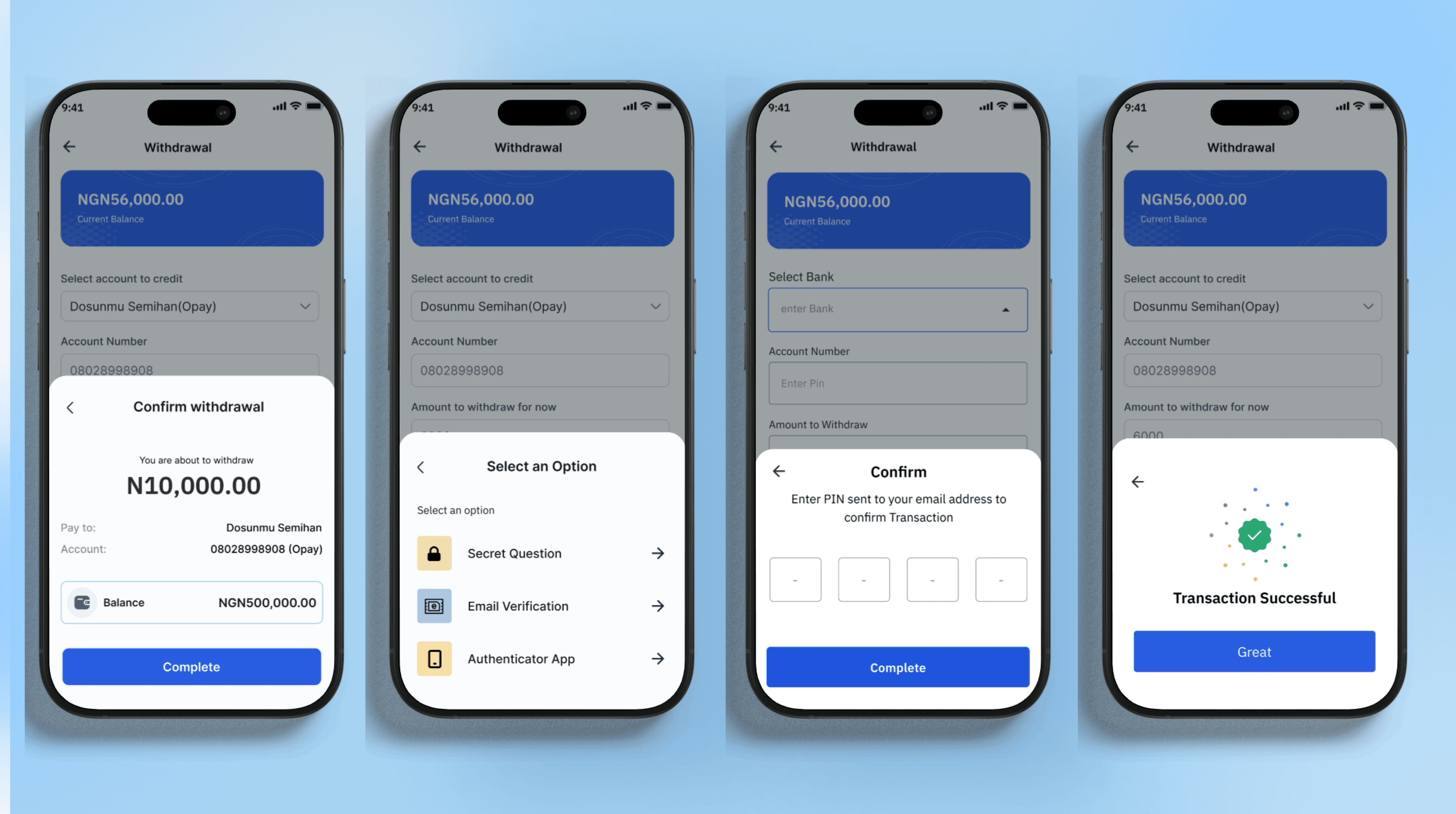
The email verification flow shows users receiving a one-time code via email, ensuring secure and timely verification before withdrawal approval
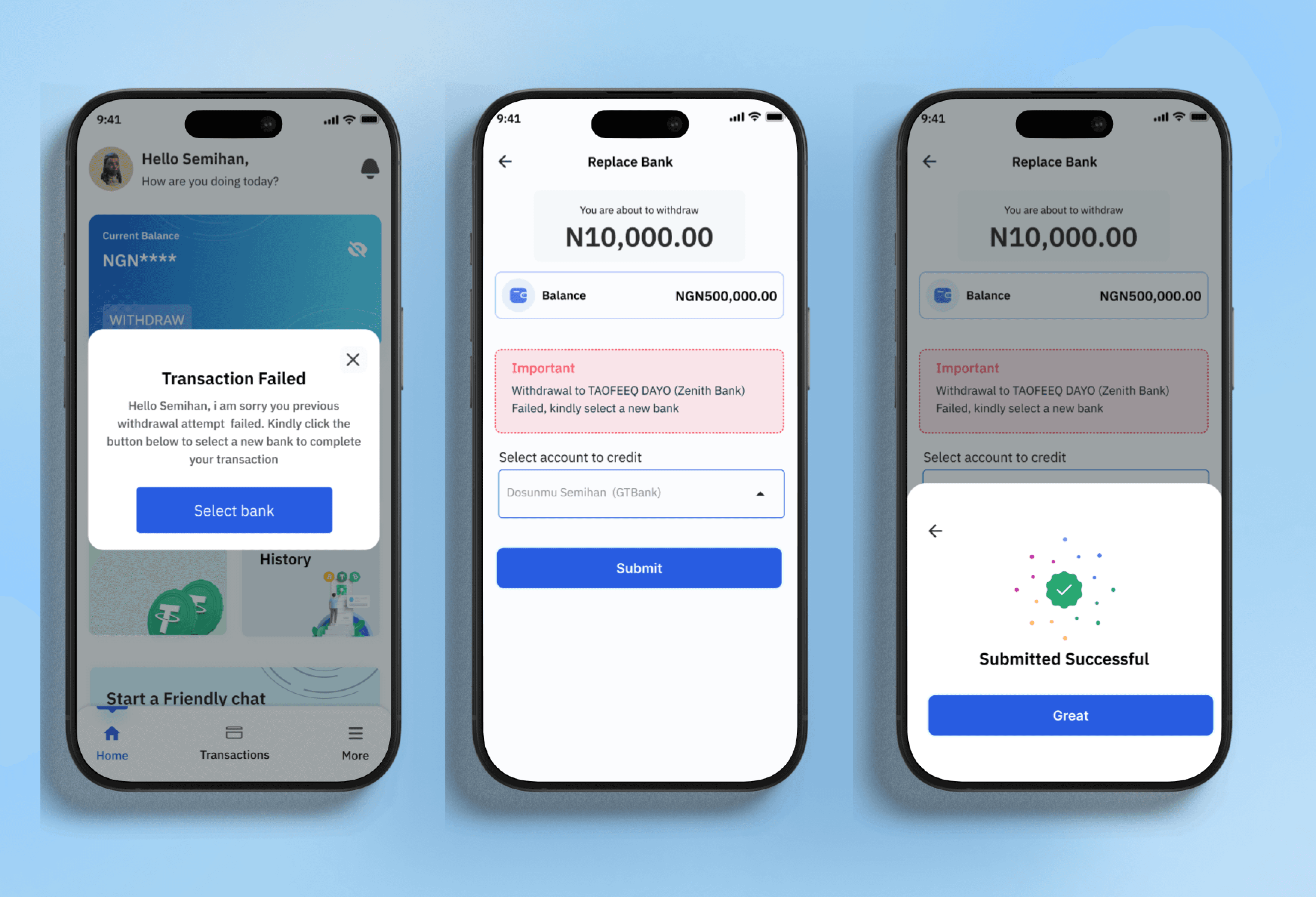
The bank replacement mechanism flow highlights a guided process for users to quickly update their bank details after failed transfers, emphasizing clarity and ease of use.
My Process
Building the Solution
To address the challenges users faced with withdrawals and uncredited bank transfers, I followed a structured, user-centric design process. Drawing insights from my research, I explored multiple design concepts and iterated based on user feedback. My objective was to create a streamlined, secure, and flexible withdrawal system tailored to users' needs and expectations. Key solutions included:
Diversified Authentication Methods: Implemented secret questions, email verification, and app-based authentication to enhance security.
Fallback Mechanism for Failed Transactions: Designed a feature that prompts users to update their bank details quickly when withdrawals fail.
This iterative approach ensured the final design aligned closely with user needs and expectations.
Sketches & Iterations

A detailed user flow diagram showcasing the withdrawal process, with key decision points for verification methods and bank detail updates after failed transfers.
Reflection
What I Learned Along the Way
The redesigned withdrawal process reduced complaints by 60%, boosted user confidence, and increased retention rates.
Key lessons learned:
User Empowerment: Multiple security options build trust.
Iterative Testing: Regular user testing ensures relevance.
Proactive Solutions: Anticipating issues improves the overall experience.